Represent yourself at an Employment Tribunal with organised, hearing-ready software.
Bring your evidence, timeline, documents, deadlines, tribunal letters and preparation work into one clear workspace, with source-backed assistance designed for people representing themselves.
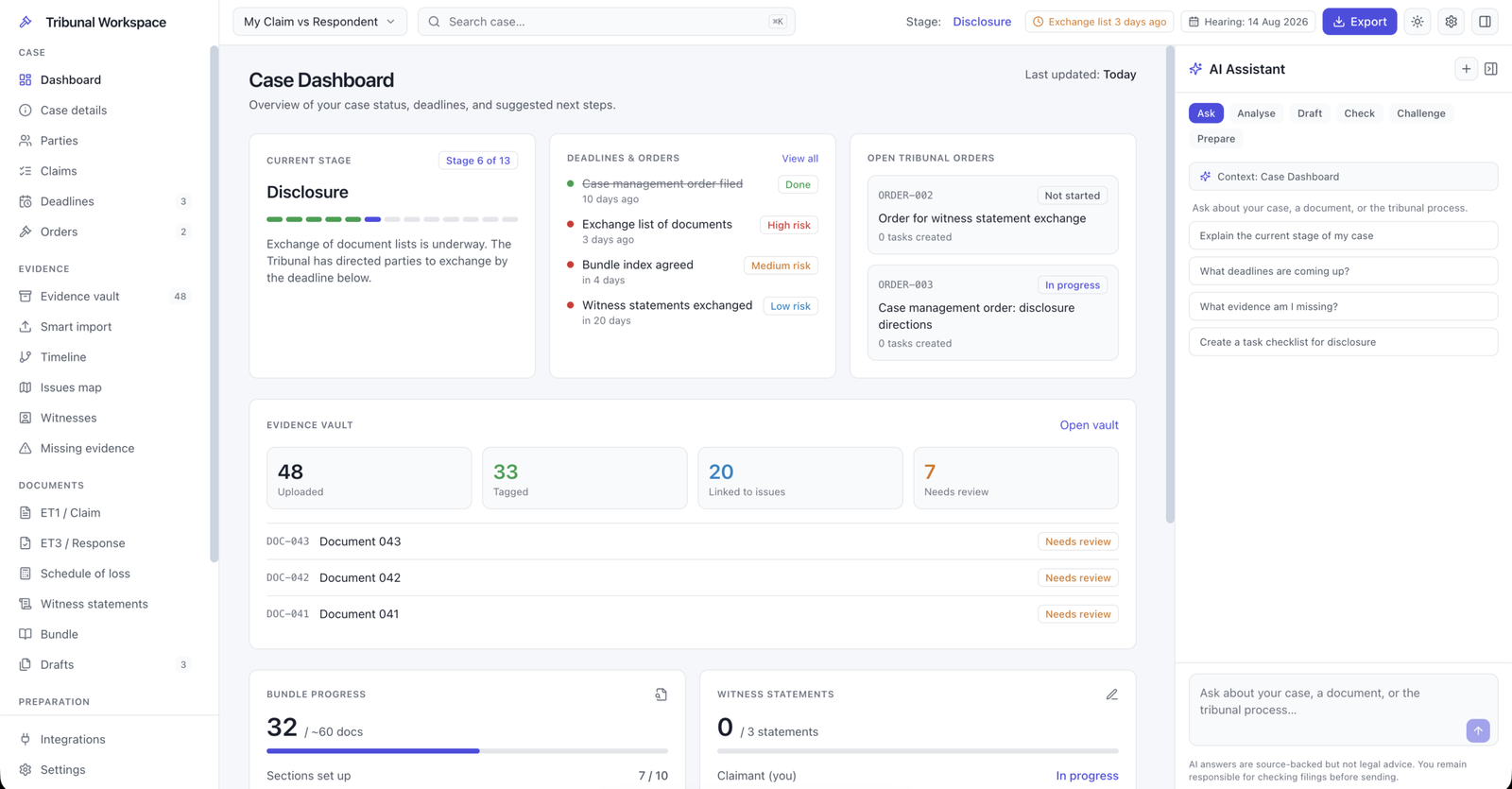
Self-Representation Case Hub
Employment Tribunal preparation workspace
- Build a clear timeline of what happened
- Organise evidence, documents and correspondence
- Track ACAS, ET1, ET3, directions and hearing tasks
- Prepare bundles, statements and case summaries
Built for everyone who goes it alone.
Employment Tribunal cases are stressful enough without trying to manage everything across emails, screenshots, documents and notes. The product is designed to give structure to people who do not have a legal team.
Bringing a claim without a solicitor
Keep your timeline, evidence, ACAS details, ET1 information and preparation work in one organised place.
- Claim timeline
- Evidence categories
- Deadline tracking
Defending a claim as a small employer
Understand the process, organise the response and prepare your documents without losing track of directions.
- ET3 preparation notes
- Document requests
- Hearing checklist
Supporting someone through their case
Help a friend, family member or colleague keep the case organised without taking over or losing important detail.
- Shared case overview
- Document structure
- Preparation prompts
People do not lose on the merits alone. They lose ground on organisation and preparation.
A good case still needs a clear timeline, relevant evidence, reliable documents, sensible arguments, deadlines under control and hearing materials that are easy to follow.
Scattered evidence
Emails, screenshots, payslips, contracts and messages can quickly become hard to manage without a proper structure.
Unclear chronology
Tribunal preparation becomes easier when every key event is placed into a clear, dated timeline.
Missed deadlines
ACAS dates, tribunal orders, response deadlines and hearing preparation tasks need to be tracked carefully.
Weak document bundles
Documents need names, dates, descriptions and relevance notes so they can be found and understood quickly.
Confusing tribunal letters
Orders and directions can be difficult to understand without plain English explanations and task breakdowns.
No preparation plan
Users need to know what to prepare next, what is missing and what the hearing will usually require.
From scattered documents to a hearing-ready case.
The workspace turns a messy case into a structured preparation file, with each stage broken down into simple actions.
Set up your case
Add basic employment details, ACAS information, claim stage, parties, dates and what has happened so far.
Build your timeline
Turn events into a dated chronology with notes, linked evidence and relevance to the issues in dispute.
Organise evidence
Upload or list documents, screenshots, emails, contracts, payslips, letters, messages and witness material.
Track directions and tasks
Break tribunal orders into practical actions so you know what needs doing and when.
Prepare hearing materials
Create structured notes for your bundle, witness statement, issues, questions and hearing preparation.
Everything the case needs. Nothing it does not.
Simple tools for the actual tribunal process, not a complicated legal platform that only professionals understand.
Case workspace
A central file for the claim, parties, dates, stage, key issues and next steps.
Timeline builder
Create a clear chronology of events and link each event to supporting evidence.
Evidence vault
Organise documents, emails, messages, payslips, screenshots and contracts by relevance.
Document notes
Add plain English notes explaining what each document proves and why it matters.
ACAS tracker
Record early conciliation dates, certificate details and limitation information.
ET1 and ET3 support
Understand what the main tribunal forms normally ask for and how to structure information.
Directions checklist
Break tribunal orders into clear tasks with due dates and preparation notes.
Hearing preparation
Prepare issue lists, questions, notes, bundle checks and final hearing reminders.
Witness statements
Use structured prompts to organise statement drafts and supporting documents.
Schedule of loss
Keep calculations, loss headings, supporting evidence and assumptions in one place.
Communication log
Track correspondence with the tribunal, ACAS, the other party and advisers.
Export and bundle prep
Prepare structured exports for review, printing, sharing or future bundle creation.
Source-backed assistance. Not a robot lawyer.
The assistant is designed to explain process, structure information and point users towards relevant materials. It should not pretend to be a solicitor or invent legal advice.
Grounded explanations
Users can ask plain English questions about tribunal process, preparation tasks, forms, deadlines, letters and documents, with answers designed to show where the information comes from.
Source-backed answers
Answers can refer to guidance, tribunal process materials and your own uploaded case documents.
Plain English guidance
Tribunal letters, directions and preparation steps are broken into language users can understand.
Document aware
The assistant can help explain uploaded documents and connect them to timeline events.
Cautious by design
Where something needs professional legal advice, the platform should say so clearly.
Simple pricing for self-represented users.
Start with a clear monthly plan, or choose a custom setup if you are a business, support organisation, adviser or caseworker team.
Self-Representation Case Hub
£60 / month
A complete Employment Tribunal preparation workspace for claimants and self-represented users.
- 28 day free trial included
- Case dashboard and matter overview
- Evidence vault and timeline tools
- ACAS, ET1, ET3 and deadline tracking
- Bundle, statement and hearing preparation tools
- Source-backed AI assistant
Business, adviser or organisation
Custom
For businesses, advisers, charities, support groups or organisations managing multiple tribunal matters or users.
- Multiple users or team access
- Custom workspace setup
- Organisation-level case management
- Integration and onboarding support
- Flexible usage requirements
- Suitable for higher case volumes